
The pitch is simple: drop a /llms.txt file in the root of your site, list out your docs or key pages in Markdown, and voilà – Large Language Models will understand your site better when answering user questions.
Jeremy Howard (Answer.AI) proposed it. On November 14th, Mintlify jumped in, enabling thousands of dev docs to be “LLM-friendly” overnight. Anthropic, Cursor, Zapier, Hugging Face – they’ve all joined the parade.
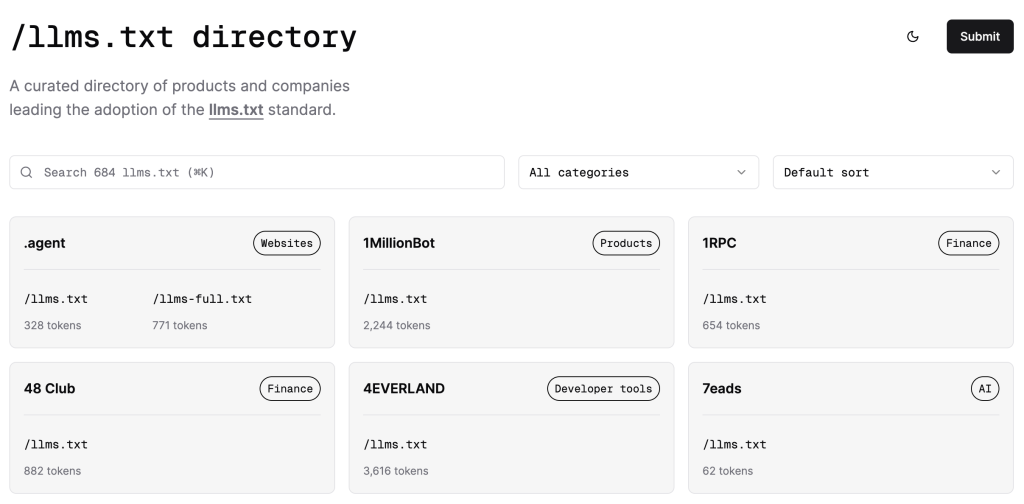
There’s even a directory: https://directory.llmstxt.cloud/.
And tools to generate it, validate it, expand it into model context.
So: Is this the next robots.txt, or just busy work for website owners?
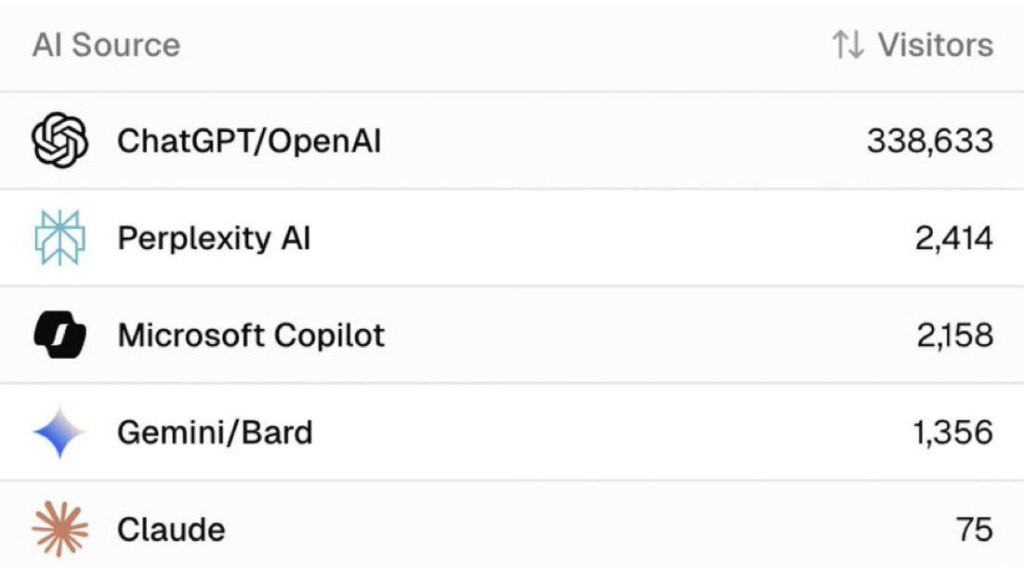
The Promise
At its best, llms.txt is a map for answer engines.
Instead of letting ChatGPT or Perplexity guess their way through your site, you hand them a tidy digest:
- The most important links.
- Human-readable summaries.
- Clear Markdown chunks that LLMs actually parse.
In theory, this improves:
- Discovery (models find the right pages).
- Accuracy (answers cite your docs, not some scraped copy).
- Brand attribution (your domain shows up in generated responses).
For technical docs, API references, and changelogs, it’s a no-brainer. That’s why Mintlify, LangChain, and OpenPipe all embraced it.
The Reality Check
But here’s where it gets murky.
- Google’s John Mueller flat out said no consumer-facing LLM is fetching this file for training or grounding. A lot of people safely ignore John Mueller, as usually things happen opposite to what he says.
- No analytics: You can’t tell if models actually consume it.
- Maintenance pain: Every site update means resyncing another CMS-in-a-file.
- Terrible UX: If an LLM cites your raw
.md, users land on an ugly dump, not your branded site. (there’s a wayout for this) - Zero guarantees: You’re formatting content for LLMs with no promise of traffic, attribution, or conversions.
That’s why some folks, like PandaHub, skipped the standard entirely. Instead, they built a clean /llm-info page: styled, branded, canonical, and tracked like any other landing page.
Guess what? That worked better.
Versions in the Wild
Popular formats that LLMs are currently fed with.

/llms.txt→ a sitemap-style index. Example/llms-full.txt→ the whole shebang in one file (context window might be tricky). Example- Per-URL
.mdfiles → one clean doc per page. Example /llm-infopages → human-readable, brand-controlled alternative. A PandaHub approach. One styled, trackable URL controlling the narrative. They saw better visibility in ChatGPT and Perplexity, with solid attribution. Perks I loved:- Single-page simplicity.
- Brand-aligned and SEO-friendly indexing.
- Keeps users on your site for conversions.
Zapier, Anthropic, Hugging Face? They’re working on it..
Perplexity? Actively consuming it.
Google? still not addressing it.
So – standard? Not there yet.
How It’s Structured
The spec is intentionally simple: a plain Markdown file, sitting at /llms.txt (or /llms-full.txt if you’re brave).
At a minimum, it includes:
- A title (H1) → usually the name of your project or site.
- A short summary (blockquote) → one-liner on what the site is about.
- Optional notes → details, quirks, compatibility, caveats.
- Sections (H2s) → grouping docs, guides, references.
- Links with descriptions → the real juice; each link is Markdown
[name](url): short description. - Some developers include: Timestamps, Version info, Token estimates for each file
Here’s a stripped-down example:
# FastHTML
> FastHTML is a Python library combining Starlette, Uvicorn, HTMX, and fastcore.

Important notes:- Not compatible with FastAPI.- Works with JS-native web components, not React/Vue/Svelte.
## Docs
- [Quick start](https://fastht.ml/docs/tutorials/quickstart_for_web_devs.html.md): Overview of features- [HTMX reference](https://github.com/bigskysoftware/htmx/blob/master/www/content/reference.md): Attributes, classes, headers, events
## Examples
- [Todo list app](https://github.com/AnswerDotAI/fasthtml/blob/main/examples/adv_app.py): CRUD demo with idiomatic patterns
That’s it. The whole point is: models parse Markdown better than cluttered HTML, so you hand them a digestible map of your site.
Implementation: How to Actually Do It
1. Decide your flavor
/llms.txt: index-style, light and link-based./llms-full.txt: inline all your docs (watch context window limits).- Per-URL
.md: one clean doc per resource. /llm-info: styled HTML alternative, friendlier for humans + AIs.
Preferred way: test all, as we don’t know what works the best yet.
2. Build the file
- Keep language concise.
- Use bullet points, headings, and short summaries.
- Link to canonical URLs, not random copies.
- Optional: add timestamps, version numbers, token estimates (handy for RAG pipelines).
3. Publish it
- Place it at the site root (
/llms.txt). - Make sure it’s publicly accessible.
- Validate it with tools like llmstxt.cloud.
4. Test it
- Paste into ChatGPT/Claude and ask: “What is X about?”
- See if the answers improve with your file in context.
- Adjust as needed.
5. Maintain it
- Helpful Hack or Hype? Update alongside your docs/marketing site.
- Keep it simple. If you’re rewriting whole docs just for llms.txt, you’re doing too much.
Don’ts
- Don’t overload it with 200+ links. LLMs will truncate.
- Don’t serve raw Markdown as the only entry point for humans.
- Don’t treat it as SEO. It’s not.
Ready to Explore?

Want your site to show up in AI answers, not just Google results?
Broader AI Visibility Tips That Complemented LLMs.txt
LLMs.txt isn’t a silver bullet-I paired it with timeless principles:
- Clarity Wins: Write naturally, like explaining to a colleague. Avoid ambiguity.
- Chunking: Break into headings, bullets-easy for skimming and parsing.
- E-E-A-T Signals: Cite sources, show expertise, build trust.
- Internal Linking: Creates a logical map for humans and AIs.
This targets “answer engines” beyond traditional SEO.
Advanced Use Cases I Tested & Guidelines
- E-commerce: Guide to products; block checkout paths.
- SaaS: Expose docs/blogs; hide dashboards.
- Agencies: Highlight cases; shield client reports.
- Clinics & Doctors: Showcase treatments, expertise, and conditions; hide patient data or booking portals.
My Take
Here’s the neutral-but-practical view:
- If you have dev docs or APIs:
Create a llms.txt. It’s low-lift, helps with RAG pipelines, and costs little. - If you care about brand, UX, and conversions:
Make a/llm-infopage instead. It’s easier to maintain, looks good, and doubles as a landing page for AI and humans. - If you’re expecting traffic from this:
This isn’t SEO 2.0. It’s not even robots.txt 2.0. Think of it as metadata for models – helpful, but not transformative. This does give results, but not the best place to rely, yet a no-brainer to try.
The Bigger Picture
In 2025, we’re all optimising for AI answers, not just Google search. Call it AEO (AI Engine Optimisation) or GEO (Generative Engine Optimisation) – the idea is the same:
- Write clear, chunked, attribution-friendly content.
- Keep it up-to-date.
- Build trust with sources, authorship, and E-E-A-T.
Whether you use /llms.txt or /llm-info, the real play is owning your narrative inside AI tools.
And that’s where this movement has value.
Not as a standard. Not yet.
But as a forcing function to ask: What do we want AI to know about our site? And how do we make it easy – for both the machines and the humans?
That’s the real optimisation.
Are you thinking about enhancing your AI Visibility?
Let’s make you LLM-visible.
LLMs already answer millions of questions daily about health, SaaS tools, agencies, and products.
If your content isn’t structured for them, your expertise might never surface in those answers.
That’s where we come in: we help founders, doctors, and teams create custom /llms.txt and /llm-info setups that boost your brand visibility inside ChatGPT, Claude, and Perplexity, not just Google.
We’ve built AI-visibility files for:
🏥 Medical professionals (clinic expertise recognition)
⚙️ SaaS teams (developer docs + changelogs)
🎨 Agencies (case study indexing without leaking client data)
Why update Material at all?
In 2022, a UX research intern at Google asked a deceptively simple question:
“Why do all our apps look the same… and kinda boring?”
That single question led to:
- 3 years of design iteration
- 46 research studies
- 18,000+ user interactions
The result?
Material 3 Expressive > a bold, emotional evolution of Google’s design system.
What is M3 Expressive?
It’s Material, but with feeling.
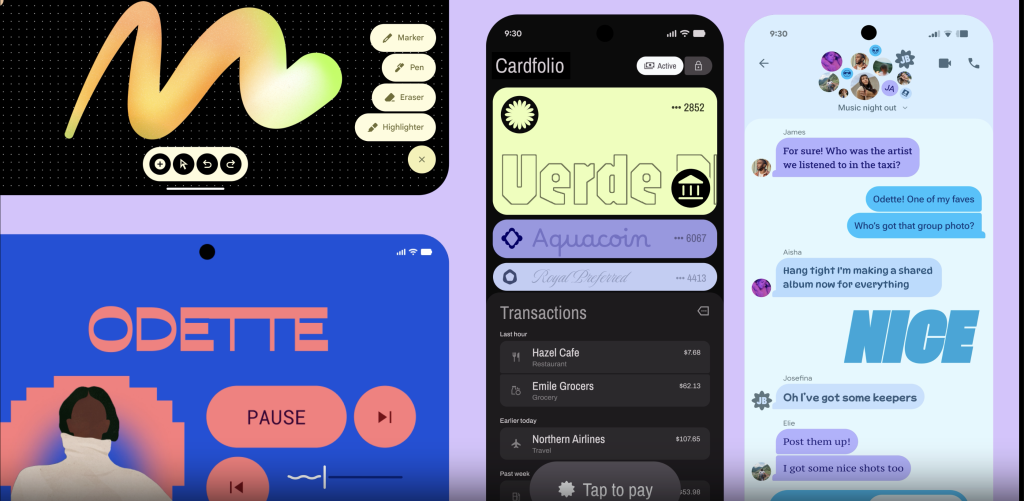
M3 Expressive brings a more vibrant and human layer to apps with:
- Vibrant color
- Intuitive motion
- Bolder shapes
- Flexible typography
- Customizable components
This isn’t just about aesthetics. It performs better, too.
What’s New in M3 Expressive
Here are just a few of the updates:
🔹 Toolbar: A more modern top app bar
🔹 Split Button: Combines primary action + dropdown
🔹 Button Groups: Visually connected action clusters
🔹 Progress Indicators: Now with a dynamic waveform style
🔹 15+ Components: Redesigned for impact and emotion
A New Motion Physics System
Motion is no longer just flair. It’s functional.
M3 introduces a token-based motion system:
- Easier to customize
- Smoother transitions
- Feels more intentional and expressive
Why This Actually Matters
M3 Expressive isn’t just prettier
It’s proven.
In research-backed testing:
- 👁 Users spotted key actions 4x faster
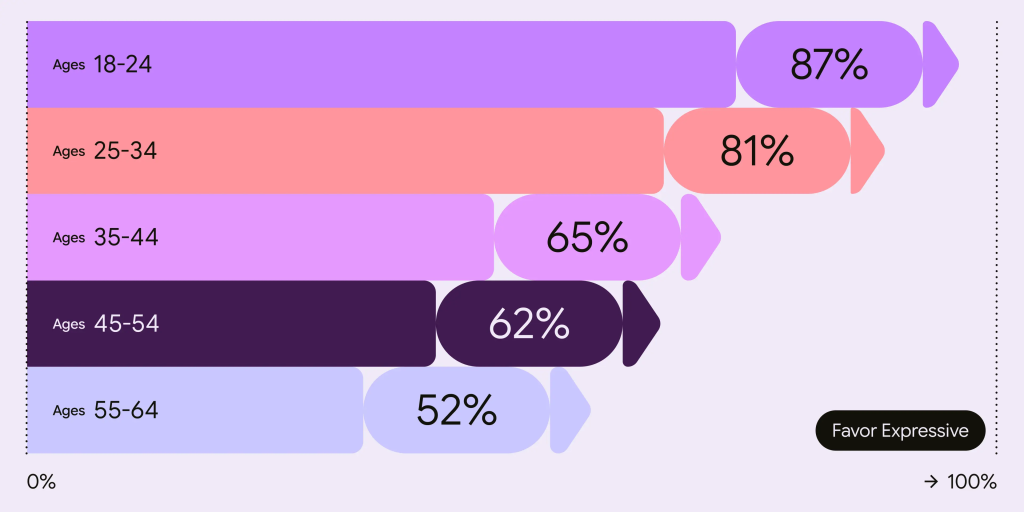
- 🧠 Older adults (45+) understood UI faster
- 💬 Interfaces rated as more intuitive and modern
That’s a win for accessibility, usability, and performance.
Expressive Design Drives Emotion
In perception studies, M3 Expressive UIs were rated:
- +34% more modern
- +32% more subcultural appeal
- +30% more rebellious
Ideal for brands seeking to feel fresh, bold, and human.
But It’s Not a Free Pass
With great design power comes great UX responsibility.
Misusing expressive tools (like removing labels or reordering UI just for style) reduced usability in some tests (right image).
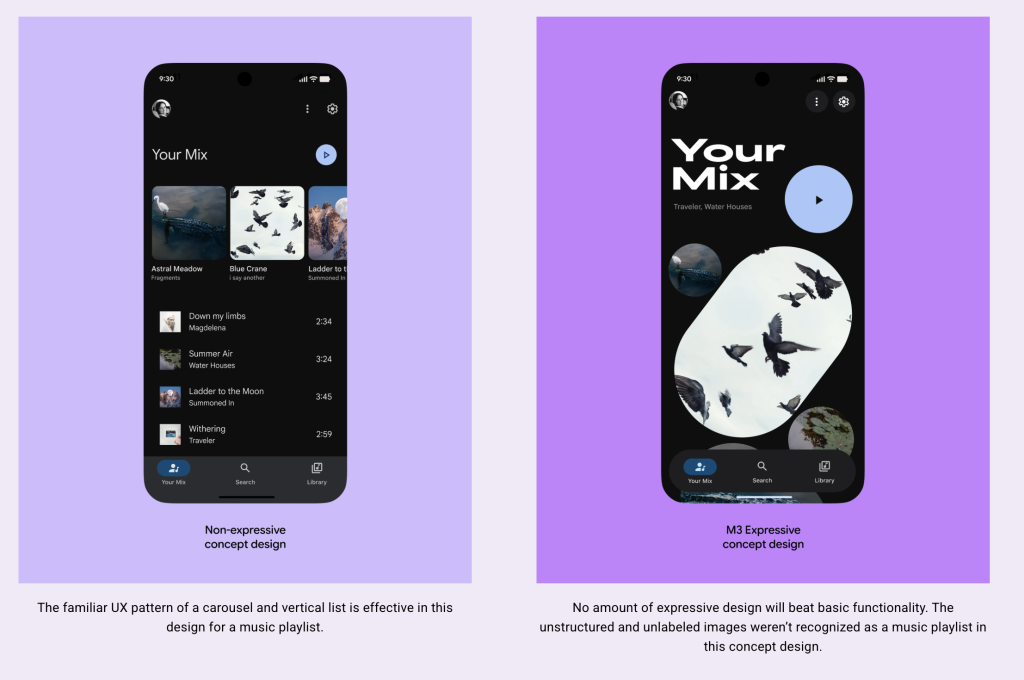
Expressive doesn’t mean decorative. Expressive means intentional.
Good Design = Inclusive Design
Here’s the most exciting bit:
In testing, older users performed as well as younger users when using M3 Expressive designs.
That means:
✅ Less friction for everyone
✅ More people completing tasks faster
✅ Apps that age gracefully with your audience
TL;DR: Time to Make Your App Feel Something
Material 3 Expressive is:
- Research-backed
- Visually bold
- Emotionally resonant
- Easier to use
- Better for everyone
This is design that connects.
Ready to Explore?
Are you thinking about migrating your UI to M3 Expressive?
Let’s discuss what that migration could look like for your app.
In May 2023, Google announced that Firebase Dynamic Links (FDL) would be deprecated with no replacement. As of today, the countdown is real: all existing FDL links will stop working on August 25, 2025: just over 100 days away.
This guide is for Flutter developers looking to migrate from Firebase Dynamic Links to other deep linking options, whether you need simple link routing or advanced features like deferred deep linking and install attribution.
What Are Dynamic Links (and Why Do They Matter)?
Dynamic links are essential for apps that care about:
- Seamless onboarding: Open to the right screen after install
- Marketing & attribution: Track installs from ads or QR codes
- Cross-platform consistency: One link that works on iOS, Android, and web
- In-app navigation: Route users to specific content via URLs
Typical Flow of a Dynamic Link
- User taps a link (e.g. from email, ad, or QR code)
- If the app is installed → it opens to the correct screen
If not → user goes to the App Store / Play Store - After install, the app opens to the linked screen (if deferred linking is supported)
Post August 25, 2025: All Firebase Dynamic Links will stop working
- Web: Shows a 404 page
- Mobile SDKs: Return 400 errors
Why is Google Deprecating FDL?
Google hasn’t given a full reason, but the ecosystem is moving toward native deep linking standards:
- 🔗 App Links (Android)
- 🍎 Universal Links (iOS)
These are more privacy-safe, OS-supported, and less reliant on a third-party intermediary.
🛠️ Your Deep Linking Options (in Flutter)
Depending on your needs, you can go native or use a third-party SDK.
Need help migrating your app? reach out: happy to help!
Option A: Native Deep Links
App Links (Android) + Universal Links (iOS)
For simple, direct in-app routing. No analytics or deferred linking.
Setup in 3 Steps:
1. Host Digital Asset Files
- Android:
URL:https://yourdomain.com/.well-known/assetlinks.json - iOS:
URL:https://yourdomain.com/.well-known/apple-app-site-association
2. Sample File for Android
jsonCopyEdit[
  {
    "relation": ["delegate_permission/common.handle_all_urls"],
    "target": {
      "namespace": "android_app",
      "package_name": "com.example.app",
      "sha256_cert_fingerprints": ["YOUR_SHA256_HASH"]
    }
  }
]
3. Sample File for iOS
jsonCopyEdit{
  "applinks": {
    "apps": [],
    "details": [
      {
        "appID": "YOUR_TEAM_ID.com.example.app",
        "paths": [ "/promo/*" ]
      }
    ]
  }
}
4. Flutter Routing with go_router
dartCopyEditfinal router = GoRouter(
  routes: [
    GoRoute(
      path: '/',
      builder: (_, __) => HomeScreen(),
      routes: [
        GoRoute(
          path: 'promo',
          builder: (_, __) => PromoScreen(),
        ),
      ],
    ),
  ],
);
🚫 What You Don’t Get with Native Links:
- No deferred deep linking (new users won’t land on the right screen after install)
- No campaign tracking or attribution
- No short link generation
Option B: Use a Deep Linking SDK (for deferred linking + analytics)
| Platform | Key Features |
|---|---|
| Branch.io | Deferred links, custom domains, short links, analytics |
| AppsFlyer | Deep links + full-funnel ad attribution & campaign insights |
| Adjust | Attribution, fraud detection, mobile analytics |
| Kochava | Install tracking, QR support, SMS/Email linking |
| Bitly | Simple branded short links + analytics |
These SDKs are your best bet if you need install tracking, deferred links, or marketing attribution.
🔁 Migrating from Firebase Dynamic Links
Step 1: Export Your FDLs
From the Firebase console, download all existing links via CSV.
Step 2: Choose the Right Path
| Your App Needs… | Recommended Solution |
|---|---|
| Simple routing only | App Links / Universal Links |
| Deferred deep linking | Branch / AppsFlyer / Adjust |
| QR Codes + marketing analytics | Kochava / Bitly / AppsFlyer |
| Campaign performance tracking | AppsFlyer / Branch |
Step 3: Update Your Flutter App
- Remove FDL SDKs & dependencies
- Add the new provider’s Flutter SDK
- Update link routing logic (e.g. using
getInitialLink,go_router, or provider-specific handlers) - Test on iOS & Android, with and without app pre-installed
Bonus: Real-World Example
Let’s say you’re running an event app:
- You want to send new users a link to a specific event
- If the app is installed → they open directly to the event
- If not → they go to the App Store, install, and still land on the right event
➡️ Use Branch.io or AppsFlyer, which support deferred deep linking, attribution, and short links.
Best Practices
- Use HTTPS and custom domains for all links
- Test fallback behavior (broken link ≠ broken UX)
- Track link performance in dashboards (especially during launch campaigns)
- Secure your asset files: they control your app’s linking permissions
📚 Resources & Links
- Firebase Dynamic Links FAQ (Official)
- Flutter Deep Linking Guide
- Branch Flutter SDK Docs
- AppsFlyer Flutter Guide
- Adjust Flutter SDK
- Kochava SDK Docs
⚠️ Final Reminder
All Firebase Dynamic Links will stop working on August 25, 2025.
Start migrating now to avoid broken user experiences, lost attribution data, and failed campaigns.
Need help migrating your app? reach out: happy to help!
]]>
The answer is a resounding yes. In fact, understanding Flutter’s layout system is more essential than ever. As we begin to integrate intelligent agents and model-driven UI states, a solid grasp of layout mechanics allows you to build UIs that are not just reactive—but adaptive, scalable, and emotionally resonant.
This guide covers responsive design techniques in Flutter and reframes them in the context of modern tooling like Bolt, agent UIs, and lovable app design.
Why Responsive Design Still Matters in 2025
Modern UIs need to adapt across not just screens—but also:
- Device contexts (foldables, desktops, ultra-wide monitors)
- Model states (MCPs triggering different UIs)
- AI-generated or agent-driven layouts
Even with AI composing parts of the UI, developers are still responsible for guiding layout structure, ensuring accessibility, and crafting delightful, context-aware interactions.
Responsive layouts remain the foundation for scalability, personalization, and seamless cross-device experience.
Core Flutter Layout Concepts
1. Widget-Based Layout System
Everything in Flutter is a widget—including layout structures. This composable model makes it easy to encapsulate and reuse layout logic.
2. Constraint-Based Rendering
Widgets receive layout constraints from their parent and size themselves accordingly. This model allows for granular control of layout behavior.
3. Foundational Widgets for Responsive UI
Container: For spacing, alignment, and decoration.Row/Column: Horizontal and vertical layout control.Stack: For overlaying widgets, useful for layering elements.
Key Techniques for Responsive Design
1. Using Flexible and Expanded
Row(
  children: [
    Expanded(flex: 2, child: Container(color: Colors.red)),
    Expanded(flex: 1, child: Container(color: Colors.blue)),
  ],
)
Use Expanded when children should divide space proportionally. This is still valid, even when layouts are chosen by AI or agents.
2. LayoutBuilder: Layout Decisions Based on Space
LayoutBuilder(
  builder: (context, constraints) {
    return constraints.maxWidth > 600
        ? WideLayout()
        : NarrowLayout();
  },
)
Especially powerful when used with state-driven models (MCP) or agent responses.
3. MediaQuery: Get Device Info
final screenSize = MediaQuery.of(context).size;
if (screenSize.width > 800) {
  return LargeWidget();
} else {
  return SmallWidget();
}
Still critical when developing multi-device experiences and verifying AI-generated layout variations.
4. OrientationBuilder: Respond to Screen Rotation
OrientationBuilder(
  builder: (context, orientation) {
    return orientation == Orientation.portrait
        ? PortraitLayout()
        : LandscapeLayout();
  },
)
Essential for mobile-first and tablet-hybrid UIs.
5. AspectRatio: Maintain Proportions
AspectRatio(
  aspectRatio: 16 / 9,
  child: Container(color: Colors.green),
)
Ideal for video players or agent-driven visual modules.
Custom Grids and Staggered Layouts
Responsive GridView Example
GridView.count(
  crossAxisCount: MediaQuery.of(context).size.width > 600 ? 3 : 2,
  children: List.generate(9, (index) {
    return Center(child: Text('Item $index'));
  }),
)
Staggered Layout with flutter_staggered_grid_view
StaggeredGridView.countBuilder(
  crossAxisCount: 4,
  itemCount: 8,
  itemBuilder: (context, index) => Container(
    color: Colors.green,
    child: Center(child: CircleAvatar(child: Text('$index'))),
  ),
  staggeredTileBuilder: (index) => StaggeredTile.count(2, index.isEven ? 2 : 1),
)
Use cases include news feeds, dashboards, and AI-assembled interfaces.
Agent-Driven and Model-Adaptive Layouts
Adaptive Layouts with MCP or Agent State
class AdaptiveContainer extends StatelessWidget {
  @override
  Widget build(BuildContext context) {
    return LayoutBuilder(
      builder: (context, constraints) {
        final currentModel = context.watch<MyComposableModel>();
        return currentModel.isWideView
            ? WideContainer()
            : NarrowContainer();
      },
    );
  }
}
This is where agents and models meet responsive design.
AI + Developer: A Powerful Duo
AI agents can generate scaffolds or dynamic UIs, but as a developer:
- You ensure accessibility, responsiveness, and performance.
- You define constraints, breakpoints, and edge-case handling.
- You guide layout aesthetics to create lovable, human-first interfaces.
Bonus: Scalable Graphics with SVG
SVGs remain important for web UIs:
SvgPicture.asset(
  'assets/my_icon.svg',
  width: 50,
  height: 50,
)
Perfect for icon systems and resolution-independent visuals.
Closing Thoughts: Building Lovable, Scalable, Responsive UIs
Responsiveness in Flutter is no longer just about screen size—it’s about adaptability. Whether you’re reacting to user intent, device size, or AI-driven decisions, knowing the layout fundamentals enables you to build UIs that feel natural, elegant, and scalable across any context.
In the era of intelligent UI, the basics aren’t outdated—they’re superpowers.
]]>This guide shows you how to manage multiple Flutter versions efficiently using FVM (Flutter Version Management) and Puro.
Why Use Multiple Flutter Versions?
- Legacy Support: Older projects might depend on specific versions.
- Testing: Ensure your app works across multiple Flutter releases.
- Experimentation: Try out beta/dev features without affecting production code.
- Team Alignment: Keep version consistency across team members and CI environments.
Option 1: FVM
FVM is an open-source tool built and maintained by the Flutter community. It simplifies version management by allowing per-project SDK configurations, speeding up channel switching, and reducing environment inconsistencies across teams.
1. Install FVM
Install FVM globally on your system using Dart:
dart pub global activate fvmOnce installed, the fvm command will be available via your terminal.
2. Install Multiple Flutter Versions
You can install as many Flutter versions as you want:
fvm install 2.10.0
fvm install 3.0.0
fvm install stable
fvm install beta
This caches each version locally so switching is instant and offline-ready.
3. Use a Specific Flutter Version in a Project
Before setting the version, make sure you’re inside your project folder:
cd path/to/your/flutter_project
fvm use 3.0.0
This does two things:
- Creates a
.fvm/directory in your project. - Creates a
fvm_config.jsonfile locking the project to that version locking the project to the specified version e.g.,3.0.0
4. Run Flutter Commands via FVM
To use Flutter CLI commands with the version set above:
fvm flutter pub get
fvm flutter run
fvm flutter build apk
This ensures you’re always using the correct version per project.
5. Switching Between Versions
To switch the Flutter SDK version for a project, simply run:
fvm use 2.10.0You can switch versions at any time. FVM handles the linking.
6. List Installed Versions
See all installed Flutter versions on your machine:
fvm listIDE Configurations
VSCode: Add this in .vscode/settings.json
{
   "dart.flutterSdkPath":".fvm/flutter_sdk",
   "search.exclude":{
      "/.fvm":true
   },
   "files.watcherExclude":{
      "/.fvm":true
   }
}
Xcode: In Build Phases → Run Script:
# Ensure Flutter SDK path is set for Xcode builds
export FLUTTER_ROOT="$PROJECT_DIR/../.fvm/flutter_sdk"
# Include path for Flutter tools (optional but recommended)
export PATH="$FLUTTER_ROOT/bin:$PATH"
# Call the Xcode build script provided by Flutter
"$FLUTTER_ROOT/packages/flutter_tools/bin/xcode_backend.sh" build
Android Studio: Set Flutter SDK path to:
/absolute-project-path/.fvm/flutter_sdkOptional: Add to .gitignore
It’s a good practice to ignore the FVM SDK path:
.fvm/flutter_sdkBest Practices for Working with Multiple Versions
- CI/CD: Use
fvmin your CI setup to ensure consistent versions across environments. - Documentation: Mention the Flutter version used in your project’s
README.md. - Stay Updated: Periodically check for new versions and run
fvm upgradeas needed.
Option 2: Puro – A Performant Alternative?
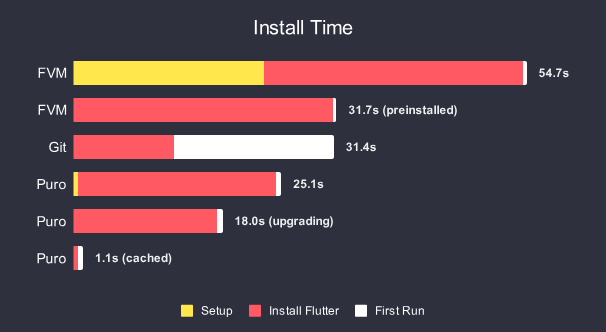
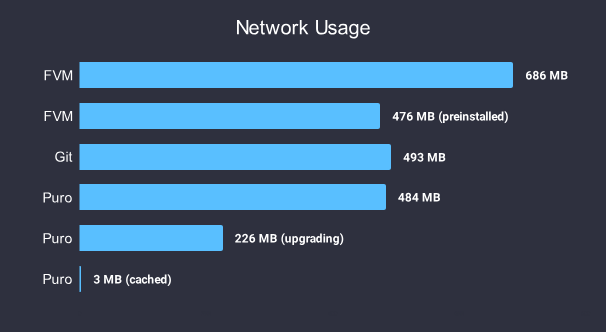
Puro is another powerful tool specifically designed for installing, managing, and upgrading Flutter versions. Its primary focus is on performance, aiming to make version management faster while using significantly less disk space and network bandwidth compared to traditional methods.
- Learn More: Puro Website, Puro on pub.dev
Key Features of Puro:
- Speed: Faster downloads and installations through parallel operations and intelligent caching.
- Efficiency: Reduced disk space and network usage via object deduplication and symlinking, especially beneficial when managing many versions.
- Environments: Uses a concept of named “environments” which can be tied to specific versions or channels (like
stable,beta) and managed globally or per-project. - Automatic IDE Configuration: Aims to configure IDE settings automatically when you switch environments.
How to install Puro on Windows, Linux, Mac?
FVM vs. Puro: Which to Choose?
- Choose FVM if:
- You prefer a widely adopted, community-standard tool.
- You are comfortable with the straightforward per-project configuration using
.fvm. - Manual IDE setup is acceptable.
- Choose Puro if:
- Performance (speed, disk space, network usage) is a major concern, especially if you manage many versions or have slower internet.
- You like the concept of named “environments” for managing versions.
- You prefer potentially automated IDE configuration.
Both are excellent tools solving the same core problem. You can even try both (though generally, stick to one per project for clarity).
How We Use AI to Manage Flutter at Scale
At Ambeego, we take an AI-first approach to building apps — not in a gimmicky or superficial way, but in ways that drive real, high-impact efficiencies where they matter most. Below are our top AI-powered strategies we recommend when operating at enterprise scale or managing a large user base:
1. AI Flutter SDK Upgrade Assistant
This AI agent reads Flutter changelogs, scans your codebase for deprecated APIs, and recommends migration steps.
It can even create a pull request with proposed changes and run tests to compare behaviors across versions. It saves dev time, reduces risk, and accelerates safe upgrades.
Enterprise impact:
- Speeds up upgrade cycles with confidence.
- Reduces risk of post-release issues.
- Saves dev time during quarterly/annual tech audits.
✅ Must-have for: Long-term support products, apps using many third-party packages, or tight CI/CD release cycles.
2. Cross-Version Compatibility Tester
This automated system uses the underlying version manager (like FVM or Puro) to sequentially check out multiple specified Flutter versions (e.g., latest stable, previous stable, latest beta) and runs your project’s test suite against each one. It outputs a clear compatibility report.
Example Output:
Flutter 3.10.6 (via puro env legacy) ✅ Tests Pass
Flutter 3.19.5 (via fvm stable) ✅ Tests Pass
Flutter 3.21.0-beta (via puro beta) ❌ build_runner failed
Enterprise Impact: Essential for QA, ensuring backward compatibility, validating libraries across versions, and catching integration issues early in CI pipelines.
Wrapping Up
Managing multiple Flutter SDK versions is a common requirement, easily addressed by tools like FVM and Puro. FVM offers a straightforward, community-backed approach with per-project configuration. Puro provides a highly performant alternative focused on speed and resource efficiency using its environment system.
Choose the tool that best fits your workflow and priorities.
]]>The Predictable Evolution
Design platforms tend to follow a four-phase lifecycle:
Phase 1: The Golden Era
An exclusive, invitation-only community forms where craft is celebrated. Feedback is meaningful, experimentation is valued, and visibility actually matters. This exclusivity creates quality control and a sense of belonging that designers crave.
Phase 2: Balanced Growth
The platform begins to expand, carefully. Access becomes easier but standards remain high. This represents the sweet spot—growth without sacrificing the platform’s soul. Companies start to notice the talent pool, creating natural opportunities for designers.
Phase 3: The Floodgates Open
Exclusivity ends completely. The platform becomes flooded with work of varying quality. The algorithm begins favoring certain styles, leading to a homogenization of design. Original experimentation gives way to trend-chasing and superficial engagement metrics.
Phase 4: The Marketplace Pivot
With community engagement declining but user numbers high, the platform fully embraces monetization. What began as “share your work” becomes “sell your work through us—or else.” Transaction fees, forced payment processing, and the commodification of creative relationships follow.
Breaking the Social Contract
The issue isn’t that platforms need revenue—every business does. The problem is the bait-and-switch. When a platform builds trust as a community for years, then suddenly transforms into a transaction gatekeeper, it breaks the original social contract with creators.
Legitimate marketplaces like Upwork or Fiverr are transparent from day one: “We’ll connect you with clients and take a cut.” By contrast, community-first platforms earn designers’ trust under one premise, then pivot to a different model once they’ve captured enough market share.
The Inevitable Exodus
Creative communities are fragile ecosystems. When the balance tips too far toward monetization at the expense of community values, designers simply move elsewhere. They’re not rejecting business models—they’re mourning the loss of spaces that once celebrated creativity over commerce.
For designers looking for authentic community experiences, smaller emerging platforms often recapture what the larger ones have lost. The cycle begins again—until venture capital demands its return on investment.
Moving Forward
As creators, our best defense is diversification. Don’t put all your work, network, and professional identity in one platform’s basket. Own your relationships, maintain your independent portfolio, and remember that while platforms come and go, the fundamental value of good design remains constant.
The next great design community is probably being built right now by people who recognize what’s been lost. Until then, we’ll continue to adapt, as designers always do.
]]>In this article, we’ll explore two standout packages: animations and flutter_animate. We’ll also look at how you can combine them for even richer animations.
Before we dive into these packages, let’s briefly recap Flutter’s built-in animation capabilities:
Flutter’s core animation system includes:
AnimationController– Drives the animation, controlling its duration and playback.Tween– Defines the range of values for an animation.AnimatedBuilder– Rebuilds the UI whenever the animation value updates.
A typical code snippet using flutter core animation system would look like
class AnimatedLogo extends StatefulWidget {
  @override
  _AnimatedLogoState createState() => _AnimatedLogoState();
}

class _AnimatedLogoState extends State<AnimatedLogo> with SingleTickerProviderStateMixin {
  late AnimationController _controller;
  late Animation<double> _animation;

  @override
  void initState() {
    super.initState();
    _controller = AnimationController(
      duration: const Duration(seconds: 2),
      vsync: this,
    );
    _animation = Tween<double>(begin: 0, end: 300).animate(_controller);
    _controller.forward();
  }

  @override
  Widget build(BuildContext context) {
    return AnimatedBuilder(
      animation: _animation,
      builder: (context, child) {
        return Container(
          height: _animation.value,
          width: _animation.value,
          child: FlutterLogo(),
        );
      },
    );
  }

  @override
  void dispose() {
    _controller.dispose();
    super.dispose();
  }
}
While this approach gives you fine-grained control, it can become cumbersome for more complex animations or when you need to prototype ideas quickly. This is what makes packages like animations and flutter_animate crucial.
Animations Package
The animation package, provided by the Flutter team, offers pre-built animations for common Material Design patterns.

Key Features:
- Container Transform – Seamlessly animates transitions between two elements.
- Shared Axis Transition – Visually links elements with spatial relationships.
- Fade Through Transition – Smoothly fades between unrelated elements.
- Fade Scale Transition – Fades and scales an element as it appears/disappears.
A typical animation code using the animations package would look like
import 'package:animations/animations.dart';

SharedAxisTransition(
  animation: animation,
  secondaryAnimation: secondaryAnimation,
  transitionType: SharedAxisTransitionType.horizontal,
  child: child,
)
Flutter Package – https://pub.dev/packages/animations
This snippet dramatically simplifies complex animations while keeping your code readable.
The flutter_animate Package: Chainable, Intuitive Animations

flutter_animate provides a powerful and intuitive API for creating complex animations with minimal code.
Key Features:
- Chainable effects – Easily combine multiple effects in a single line.
- Predefined animations – Common transitions made simple.
- Custom effects – Fine-tune animations to fit your needs.
- Performance optimized – Adapts based on device capabilities.
A typical code using the Flutter animate package would look like
import 'package:flutter_animate/flutter_animate.dart';

Text('Hello, World!')
  .animate()
  .fade(duration: 500.ms)
  .scale(delay: 200.ms)
  .move(delay: 400.ms, duration: 600.ms)
Flutter Package Link – https://pub.dev/packages/flutter_animate
Combining Both Packages
For more complex UI transitions, you can combine both packages, lets say we want to create a container that opens with a Material container transform, while also fading in and scaling up.
import 'package:animations/animations.dart';
import 'package:flutter_animate/flutter_animate.dart';

OpenContainer(
            closedBuilder: (context, action) => ListTile(title: Text('Tap me')),
            openBuilder: (context, action) => DetailPage(),
          ).animate().fade(duration: 300.ms).scale(begin: Offset(0.8, 0.8)),
        ),
Best Practices for High-Quality Animations
To create smooth and performant animations, keep these best practices in mind:
- Optimize Performance – Use
constconstructors and avoid unnecessary widget rebuilds. - Keep Animations Short – Ideally under 500ms for a responsive feel.
- Use Easing Curves Wisely – Experiment with curves like
Curves.easeInOutfor natural motion. - Ensure Responsiveness – Don’t block user interactions while animations are running.
By leveraging these tools, you can craft fluid, engaging animations that enhance the user experience—without the boilerplate code.
🚀 Ready to take your Flutter animations to the next level? Try out these packages and bring your UI to life!
Or want ambeego to help you make your app’s transition super fluid, jump on a call and let’s discuss.
]]>This Privacy Policy outlines our practices concerning the collection, use, and disclosure of your information when you use our App(Learn How to Drive Manual Car), along with your privacy rights and legal protections. Your use of the Service signifies your agreement to the collection and use of information in accordance with this policy.
Interpretation and Definitions
Interpretation
Capitalized terms are defined under the following conditions and have the same meaning regardless of whether they appear in singular or plural form.
Definitions
For the purposes of this Privacy Policy:
- Account refers to a unique account created for you to access our Service or parts of our Service.
- Application (also referred to as “the Service”) refers to the Learn How to Drive Manual Car, through which the Service is provided.
- Company (referred to as either “the Company”, “We”, “Us”, or “Our” in this document) refers to Learn How to Drive Manual Car.
- Country refers to: Pakistan, where the Company is based.
- Device means any device that can access the Service, such as a computer, cellphone, or digital tablet.
- Personal Data is any information that relates to an identified or identifiable individual.
- Service Provider means any natural or legal person who processes data on behalf of the Company. This refers to third-party companies or individuals employed by the Company to facilitate the Service or to assist the Company in analyzing how the Service is used.
- Usage Data refers to data collected automatically, generated by the use of the Service or from the Service infrastructure itself (for example, the duration of a page visit).
- You refers to the individual accessing or using the Service, or the company, or other legal entity on behalf of which such individual is accessing or using the Service.
Collecting and Using Your Personal Data
Types of Data Collected
Personal Data
This app doesn’t collect any personal information.
Usage Data
Usage Data is collected automatically when using the Service.
This may include details such as your device’s Internet Protocol address (e.g., IP address), browser type, browser version, our Service pages that you visit, the time and date of your visit, the time spent on those pages, unique device identifiers, and other diagnostic data.
When you access the Service through a mobile device, we may collect certain information automatically, including, but not limited to, the type of mobile device you use, your mobile device’s unique ID, the IP address of your mobile device, your mobile operating system, the type of mobile Internet browser you use, and other diagnostic data.
Use of Your Personal Data
The Company uses Personal Data for the following purposes:
- To provide and maintain our Service: Including to monitor the usage of our Service.
- To manage your Account: The Personal Data you provide can give you access to different functionalities of the Service that are available to you as a registered user.
- To perform contracts: Develop, comply with, and undertake the purchase contract for products, services, or items you have purchased or any other contract with us through the Service.
- To contact you: To contact you by email, telephone calls, SMS, or other equivalent forms of electronic communication, such as mobile application push notifications regarding updates or informative communications related to the functionalities, products, or contracted services, including security updates, when necessary or reasonable for their implementation.
- To provide you with news, special offers, and general information about other goods, services, and events which we offer that are similar to those that you have already purchased or enquired about unless you have opted not to receive such information.
- To manage your requests: To attend and manage your requests to us.
Retention of Your Personal Data
The Company will retain your Personal Data only for as long as is necessary for the purposes set out in this Privacy Policy. We will retain and use your Personal Data to the extent necessary to comply with our legal obligations (for example, if we are required to retain your data to comply with applicable laws), resolve disputes, and enforce our legal agreements and policies.
The Company will also retain Usage Data for internal analysis purposes. Usage Data is generally retained for a shorter period of time, except when this data is used to strengthen the security or to improve the functionality of our Service, or we are legally obligated to retain this data for longer time periods.
Transfer of Your Personal Data
Your information, including Personal Data, is processed at the Company’s operating offices and in any other places where the parties involved in the processing are located. This means that this information may be transferred to — and maintained on — computers located outside of your state, province, country, or other governmental jurisdiction where the data protection laws may differ from those from your jurisdiction.
Your consent to this Privacy Policy followed by your submission of such information represents your agreement to that transfer.
The Company will take all steps reasonably necessary to ensure that your data is treated securely and in accordance with this Privacy Policy and no transfer of your Personal Data will take place to an organization or a country unless there are adequate controls in place including the security of your data and other personal information.
Children’s Privacy
Our Service does not address anyone under the age of 13. We do not knowingly collect personally identifiable information from anyone under the age of 13. If you are a parent or guardian and you are aware that your child has provided us with Personal Data, please contact us. If we become aware that we have collected Personal Data from anyone under the age of 13 without verification of parental consent, we take steps to remove that information from our servers.
If we need to rely on consent as a legal basis for processing your information and your country requires consent from a parent, we may require your parent’s consent before we collect and use that information.
Links to Other Websites
Our Service may contain links to other websites that are not operated by us. If you click on a third party link, you will be directed to that third party’s site. We strongly advise you to review the Privacy Policy of every site you visit.
We have no control over and assume no responsibility for the content, privacy policies, or practices of any third-party sites or services.
Changes to this Privacy Policy
We may update our Privacy Policy from time to time. We will notify you of any changes by posting the new Privacy Policy on this page.
We will let you know via email and/or a prominent notice on our Service, prior to the change becoming effective and update the “Last updated” date at the top of this Privacy Policy.
You are advised to review this Privacy Policy periodically for any changes. Changes to this Privacy Policy are effective when they are posted on this page.
Contact Us
If you have any questions about this Privacy Policy, you can contact us:
- By email: [email protected]
Why Flutter? Honestly, Why Not?
Turbocharged Performance 🚀
Flutter isn’t just fast; it’s “why doesn’t every app feel this smooth?” fast.
Thanks to Dart’s JIT and AOT magic, apps on your TV are about to be as responsive as your favorite smartphone apps.
One Codebase to Rule Them All 📝
Write once, run anywhere—iOS, Android, and now, webOS. LG is cutting down on development time and costs, which means we could see smarter smart TVs faster than ever.
A Plethora of Widgets 🎨
Flutter’s widget library is a UI designer’s dream. It’s about time our TVs got a facelift to match the sleek, modern look of our handheld devices.
Vast Community Support 🌍
Flutter’s community is a powerhouse, constantly creating tools and resources that make developers’ lives easier. LG is tapping into this vibrant ecosystem for faster, more innovative development cycles.
Decoding the Buzz: Why It’s a Bigger Deal Than You Think
Speedy Development Cycles 🏃♂️
Expect more frequent updates and new features on LG TVs, making the “smart” in smart TVs feel more genuine.
Enhanced User Experience 🌟
With Flutter, we’re talking about smoother animations and more responsive interfaces. Your interaction with your TV will be as intuitive as your smartphone.
Flutter’s Growing Footprint 📈
LG’s move might push other manufacturers to consider Flutter. It’s about time everyone realized web development isn’t just for browsers.
A New Playground for Developers 💼
New platforms mean new opportunities. For the developer community, especially in regions like India where Flutter skills are hot, this could lead to more jobs and innovative projects. Discussions suggest major development hubs in Asia, like LG Soft India, taking the lead in this venture.
Let’s Get Real
While we’re all excited about Flutter, let’s not overlook the challenges. Performance on underpowered hardware has been an issue, and if LG wants this to work, they need some serious hardware upgrades. We don’t need another “great on paper, poor in execution” scenario.
So, what do you think? Is this a bold strategic win for LG and Flutter, or just another headline grabber? Either way, it’s going to be interesting to see how this plays out in the competitive smart TV market.
Share your thoughts below, and let’s chat about it!
]]>RemoFit
This End User License Agreement (“Agreement”) is a binding agreement between you (“End User” or “you”) and Ambeego (“Company”). The Agreement governs your use of the RemoFit (both the app and the service).
By downloading, installing, or using the app, you acknowledge that you have read, understood, and agree to be bound by this Agreement. If you do not agree to this Agreement, you are not authorized to use the app.
Ambeego is located at H#13/1-c, St 28, Sector G-7/1, Islamabad, Pakistan 44000. Email: [email protected].
Scope of License
The license granted to you for the app is limited to a non-transferable license to use the app on devices that you own or control. This license does not allow you to use the app on any device that you do not own or control, and you may not distribute or make the app available over a network where it could be used by multiple devices at the same time.
Legal Compliance
You represent and warrant that (i) you are not located in a country that is subject to a U.S. Government embargo, or that has been designated by the U.S. Government as a “terrorist-supporting” country; and (ii) you are not listed on any U.S. Government list of prohibited or restricted parties. You must also comply with all applicable third-party terms of agreement when using the app.
Applicable Law
This Agreement is governed by the laws of Pakistan without regard to its conflict of law principles.
Contact Information
If you have any questions about this Agreement, please contact us at Ambeego, H#13/1-c, St 28, Sector G-7/1, Islamabad, Pakistan 44000, or via email at [email protected].
Termination
The Agreement is effective until terminated by you or Ambeego. Your rights under this Agreement will terminate automatically without notice from Ambeego if you fail to comply with any term(s) of this Agreement. Upon termination, you shall cease all use of the app and destroy all copies, full or partial, of the app.
© 2024 Ambeego. All rights reserved.
]]>